Skip to content

← → step through findings · Esc close

Try the Team features free for 14 days

Building information that holds up to scrutiny

Prove model quality against rule sets and IDS, document the site so it holds up later, and hand the client evidence they can follow themselves. In the browser, nothing to install.

No credit card required · The Free plan stays free Request a live demo

Ifc4_SampleHouse.ifc · 74 elements · IFC4 · sha256 7606dc4e…

Watch the 90-second demo
  • IFC 2x3 & 4
  • BCF 2.1
  • IDS
  • DIN 276 & Uniclass
  • LAS / LAZ

The check

Design & coordination BIM coordination in the design team

Five discipline models, one question: do they meet the requirement?

The engineers deliver. The information requirements state which properties must be set. Between the two sits somebody clicking through models one by one — and ending up with an opinion, not evidence.

The same sample model as above, checked by the run the report further down also comes from. The colours show that run's result per element; nothing is staged.

What these status labels mean

  • Available Ready for production use. Server-enforced wherever this site says so.
  • In development Built, but stored locally in the browser — no team synchronisation.
  • Planned Not built yet, or not yet verified.

← → step through findings · Esc close

Result per element finding 10 passed 5 only GUID rule checked 43

Ifc4_SampleHouse.ifc · IFC4

1 · Scan

A plane travels through the model

Every element it passes shows its result: green for passed, amber for a finding. Elements that only the “Unique GUIDs” rule checked stay pale — a pass like that says little, and that is how it is shown.

  1. Load the model into project storage; each new revision becomes a version of its own.

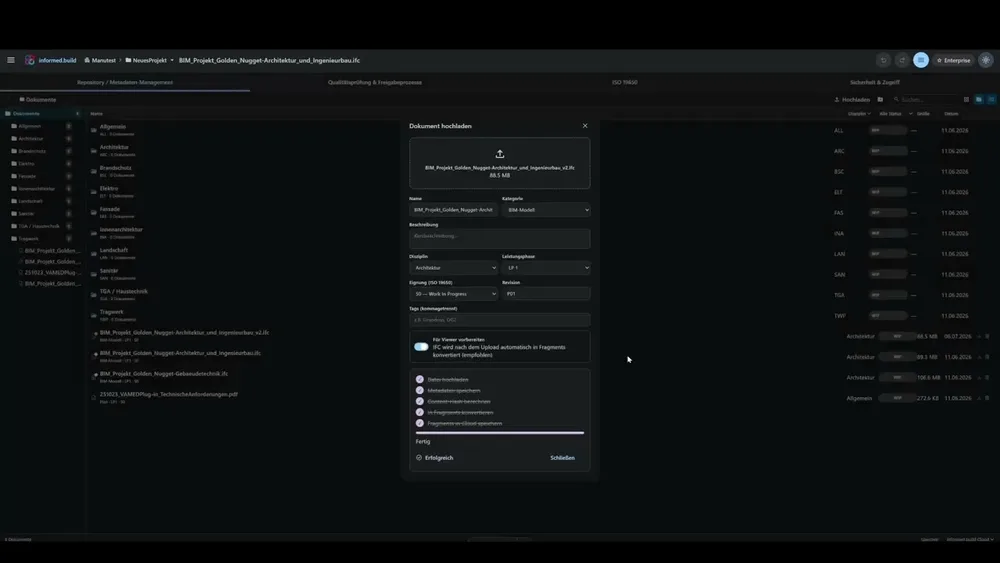
    Documents & CDE Available

  2. Check it against your own rule set or the client's IDS.

    Rules & IDS Available

2 · Findings

10 elements with a finding

Rules with findings

  • FireRating: allowed values 10 of 10 elements
  • Walls: FireRating present 5 of 5 elements
  • Minimum door width (all doors) 2 of 3 elements

The findings on the model

  1. IfcDoor 3cUkl32yn9qRSPvBJVyWaG FireRating: allowed values · Minimum door width (all doors)
  2. IfcDoor 3cUkl32yn9qRSPvBJVyWax FireRating: allowed values · Minimum door width (all doors)
  3. IfcWall 3cUkl32yn9qRSPvBJVyWw5 Walls: FireRating present · FireRating: allowed values
  4. IfcWall 3cUkl32yn9qRSPvBJVyWx4 Walls: FireRating present · FireRating: allowed values
  5. IfcWall 3cUkl32yn9qRSPvBJVyWy4 Walls: FireRating present · FireRating: allowed values
  6. IfcWallStandardCase 3cUkl32yn9qRSPvBJVyWXt Walls: FireRating present · FireRating: allowed values
  7. IfcWallStandardCase 3cUkl32yn9qRSPvBJVyWY1 Walls: FireRating present · FireRating: allowed values
  8. IfcDoor 3cUkl32yn9qRSPvBJVyWYp FireRating: allowed values
  9. IfcSlab 3cUkl32yn9qRSPvBJVyWgQ FireRating: allowed values
  10. IfcSlab 3ntFzSulnDNeQ4nJrMgcOt FireRating: allowed values

31 rules run · 14 published · 17 excluded — and why

Colour comes from 10 of the 14 published rules: 3 check the model as a whole, 1 finds the checked property on no element and therefore does not count as a pass.

  1. Read the result per requirement: passed, missing, or wrong value.

    Checking Available

3 · Handoff

Findings back to the authors as BCF

IDS requirement: 4 specifications

  • Wände: Pset_WallCommon vollständig 0 of 5 passed
  • Wände: U-Wert höchstens 0,28 W/(m²K) 3 of 5 passed
  • Fenster: U-Wert höchstens 1,60 W/(m²K) 0 of 4 passed
  • Türen: Kennzeichnung und Brandschutz 0 of 3 passed
IDS findings as BCF 2.1 4 topics · 12 elements · 4.3 KB ids-befunde.bcfzip Download the BCF file

The file opens in common BIM tools.

8 of the 10 marked elements are also in the BCF file. It carries the findings of the IDS check, not those of the rule check.

  1. Hand the findings back to the authors as BCF 2.1.

    Issues & BCF Available

  2. The correction comes back as a new version — the old one stays traceable.

    Versioning Available

What you end up with

A check report with a pass rate per requirement, and a BCF 2.1 file that opens in common BIM tools. Not a “looks fine to me”.

What does not work yet

  • We can read and evaluate IDS — we cannot author it.
  • Geometry-based rules need the loaded 3D scene — they do not run purely server-side.

Automatic classification to DIN 276 Watch demo

Evidence

Evidence, not promises

The platform produced the document below itself, in one run over the sample model. Every figure comes from that run; the command at the end repeats it, and the files are there to download.

modellpruefung.json Model SHA-256 7606dc4e96b5…

Model check report

Ifc4_SampleHouse.ifc · 74 elements · IFC4

31 rules run · 14 published · 17 excluded

12 rules check geometry and need the loaded 3D scene · 4 found no applicable elements in this model · 1 needs classification done in the application.

14 Rules in the report
74 Elements in the model
17 Deviations

Rules

Rules
Rule checked failed Pass rate
FireRating: Erlaubte Werte 10 10 0%
Wände: FireRating vorhanden 5 5 0%
Türbreite Mindestmaß (alle Türen) 3 2 33.3%
Eindeutige GUIDs 74 0 100%
Elemente: Name nicht leer 14 0 100%
Modellstruktur: Geschoss-Zuordnung 14 0 100%
Wandtyp-Konsistenz "FireRating" ist auf keinem der 5 anwendbaren Elemente belegt — das Ergebnis ist leer, nicht gut. 5 0 not evaluated
Modell-Vollständigkeit 4 0 100%
Sehr große Räume (Flächen-Grenzwert) 4 0 100%
U-Wert für Außenbauteile 4 0 100%
Decken: LoadBearing definiert 2 0 100%
Gebäudehierarchie vollständig 2 0 100%
Material für tragende Elemente 2 0 100%
Modell hat Räume 1 0 100%
Total 144 17

IDS validation informed.build Demo-Prüfvorgabe

IDS validation
Specification applicable passed failed Pass rate
Wände: Pset_WallCommon vollständig 5 0 5 0%
Wände: U-Wert höchstens 0,28 W/(m²K) 5 3 2 60%
Fenster: U-Wert höchstens 1,60 W/(m²K) 4 0 4 0%
Türen: Kennzeichnung und Brandschutz 3 0 3 0%

4 topics · BCF 2.1 · 4.3 KB

The IDS check's findings as BCF 2.1 — the file opens in common BIM tools.

Rule and specification names appear exactly as they do in the generated report (German).

Generated from Ifc4_SampleHouse.ifc · 74 elements · IFC4 using node scripts/marketing/gen-evidence.mjs

ConstructionSite management and subcontractors

What happens on site today must still be provable in a dispute.

The daily report gets written from memory in the evening, the defect hangs on the wall as a paper note — and the subcontractor who has to fix it has no account in your system.

The workflow

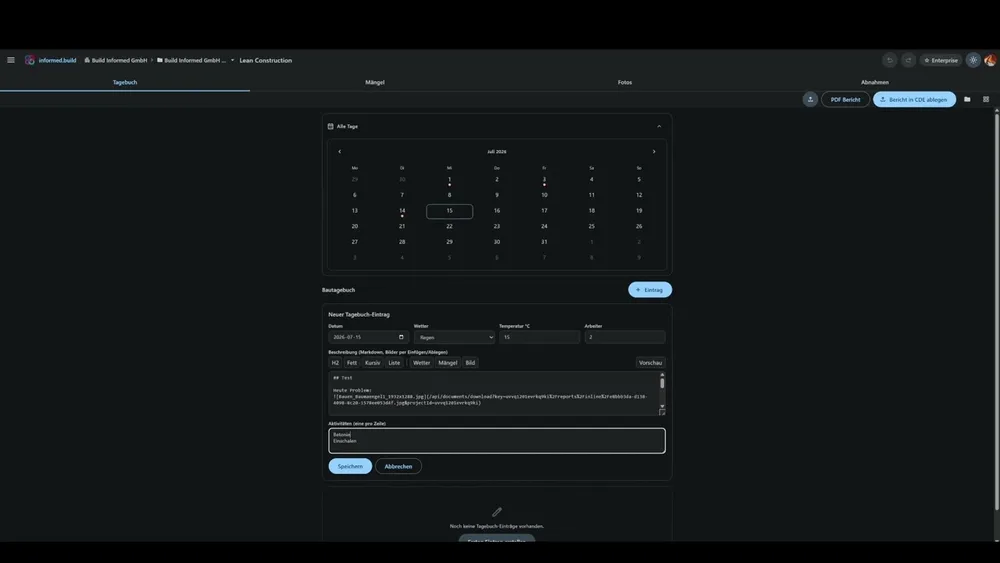
  1. Write the daily report — one entry per day, not two.

    Site diary Available

  2. Request signatures, including from people without a user account.

    Daily report Available

  3. The signature is bound to the document: it carries that document's SHA-256 checksum.

    Signatures Available

  4. Sequential numbering in date order — no gaps, nothing filed retroactively.

    Numbering Available

  5. Defect by QR code on the wall, response link to the subcontractor. If they report “Done” with a photo, the defect is set to resolved automatically.

    Defects Available

What you end up with

A signed daily site report as a PDF whose signatures are bound to the checksum of that exact document — plus a running log of every signature event with time, IP address and device.

What does not work yet

  • Scheduling and health & safety are not yet part of this workflow.
  • Capturing defects on the model does not replace a formal handover inspection.
Site diary, defects and inspections Watch demo
IFCWALL 3cUkl32yn9qRSPvBJVyWy4 Schematic · element ID from the sample model Ifc4_SampleHouse.ifc
  1. 01 / 04

    QR code on the defect

    The sticker on the wall opens the defect in the browser — no user account needed.

    informed.build/m/…
  2. 02 / 04

    Response link by email

    Whoever has to fix the defect gets a personal link. No account needed either.

    informed.build/r/…
  3. 03 / 04

    “Done” only with a photo

    Without at least one photo the response cannot be sent. “Delayed” also requires a reason.

  4. 04 / 04

    Status: resolved

    A “Done” response sets the defect to resolved automatically, with the day of the response as its date. Not possible for days already locked by a final report.

Signature bound to the checksum

A signature is valid for exactly one version.

Before anyone signs, the daily site report is frozen as a PDF. Its SHA-256 checksum is computed server-side and attached to every signature. Change one character and the signature no longer fits — try it.

Daily site report · Sample project Sample text
SHA-256 of the current text—
Signature · site managementWaiting for the checksumbound to —

Change a single character: the checksum changes completely and the signature no longer fits. Undo the change and it is valid again. The checksum is computed with JavaScript in your browser; nothing is sent.

This is a demonstration of the principle; signatures in the product are logged server-side.

Handover & acceptance

You receive models. How do you know they're correct?

Client and project control

The difference between “checked” and “demonstrably checked” is the one you only notice once it is disputed.

The workflow

  1. Your own project role with read and approval rights, no administration rights by default. Whoever may approve may also write.

    Roles & permissions Available

  2. Read the check reports and BCF findings yourself instead of accepting assurances.

    Checking Available

  3. Version history per document: who, when, which revision.

    Audit trail Available

  4. Approval per version — server-side, bound to the approval right.

    Approvals Available

  5. Signed daily site reports as part of the handover.

    Daily report Available

What you end up with

Evidence you can follow yourself — instead of a statement that checking took place.

What does not work yet

  • The document approval workflow (WIP → Shared → Published) currently runs in the application and is not yet enforced on the server.
  • The audit trail covers documents and signatures — not changes to roles and permissions.
  • Exporting the audit trail is restricted to project administrators — the client role described here does not have it without additional rights.
CDE with versioning and approvals Watch demo
Sample project / Structural-model.ifc Example — what a record looks like
Versions
Version Status Uploaded by Status set by
v3 P03 Draft Specialist planner 2026-03-19 10:05 —
v2 P02 Approved kept permanently Specialist planner 2026-03-11 14:32 Client
v1 P01 Rejected kept permanently Specialist planner 2026-03-02 08:41 Client

Only someone holding the approval right can set a version's status.

Audit trail for this document

Logged on the server, append-only.

  1. 2026-03-02 08:41 created Structural-model.ifc Specialist planner
  2. 2026-03-04 16:20 version_status_changed v1: draft → rejected Client
  3. 2026-03-11 14:32 version_added v2 Specialist planner
  4. 2026-03-13 09:10 version_status_changed v2: draft → approved Client
  5. 2026-03-19 10:05 version_added v3 Specialist planner
Log export as CSV or JSON — restricted to project administrators.

Governance

What we do not claim

Struck through: what we do not claim. With each, what holds instead. The list grows when we notice something, and shrinks when we have built something.

  1. Not claimed: ISO 19650 certified

    We are not ISO 19650 certified and do not enforce the approval status transition on the server.

  2. Not claimed: Guaranteed availability and storage region

    We do not commit to a storage region or to availability unless that is expressly agreed by contract.

  3. Not claimed: Single sign-on, dedicated instance, on-premises

    We have no single sign-on, no dedicated instance and no on-premises operation. The corresponding enterprise items are marked “on request” because they are to be agreed contractually and are not part of the product.

  4. Not claimed: Gapless audit trail

    Our audit trail is not gapless: changes to roles, memberships and billing, and downloads, are not captured.

  5. Not claimed: Every geometric check exact

    We do not claim every geometric check is exact: collision checking confirms hits triangle-accurately, but distance, containment and duplicate checks work on bounding volumes.

  6. Not claimed: Reference customers

    We have no reference customers to show. As soon as approved ones exist, they will be named here.

  7. Not claimed: Every module ready for teams

    Modules labelled “in development” store data locally in the browser. They are suitable for trying out, not for working as a team.

  8. Not claimed: Processing limits in figures

    We do not quote figures about processing limits that a code change could silently render false.

The governance page sets out roles, approvals, versioning, audit trail, data storage and export in detail — each split by what the server enforces and what only the application manages.

Go to the governance page

Tools

The everyday toolkit

The foundation under all three workflows — in the browser, nothing to install.


3D IFC viewer

3D IFC viewer

Available


Open and analyse BIM models in the browser: navigate storeys, place section planes, measure distances, areas and angles.

IFC 2x3 & 4Storey navigationSection planesMeasurement
Data table with inline editing

Data & properties

Available

Search, filter and edit all model data in a table — with virtual scrolling even for very large models. Save your changes back to project storage as a new IFC version.

Point cloud rendering

Point clouds

Available


Laser scans in LAS and LAZ straight in the browser — octree-based LOD rendering for large point clouds. As-built comparison against the BIM model in quality management.

File viewer

Available

Open drawings, calculations and documentation directly — with markups and comments, no download and no extra software.

PDFDWGDXFXLSXDOCX3D-Meshes

Feature index

Everything, with its actual status

The complete list of modules. The status is the same one shown on our public roadmap — we do not keep a second, friendlier version.

11 available 13 in development 6 planned

Available today

Ready for production use

  • 3D Viewer Available

    IFC & point clouds, sections, storey navigation, measurement tools

  • File Viewer Available

    PDF, DWG, DXF, XLSX, DOCX, images & 3D meshes — with markups & comments

  • Data & Properties Available

    Virtualised table, inline editing, save as a new IFC version

  • Issues & BCF Available

    BCF-based issue management, Kanban, 3D placement

  • Classification Available

    DIN 276, Uniclass, auto-classification with rule sets

  • Rules & IDS Available

    Rule sets, IDS import & validation

  • Checking Available

    Model validation with 3-panel layout, ghost mode & BCF export

  • Quality Management Available

    Point-cloud as-built comparison against the BIM model

  • Documents & CDE Available

    ISO-19650-oriented: suitability codes, versioning, audit trail

  • Settings Available

    Language, theme, viewer configuration, data management

  • Lean Construction Available

    Site diary, defects, inspections, signed daily reports

2

In development

Built — local to the browser, no team synchronisation

  • Project Management In development

    HOAI phases, milestones, tasks, checklists

  • Multi-Model In development

    Merge, split, 3D diff comparison

  • Coordination In development

    Multi-model viewer with point-cloud integration

  • Reporting In development

    Information takeoff, quantities, property pivot, statistics

  • Sustainability In development

    Energy certificate, ESG assessment, life-cycle analysis

  • Cost Planning In development

    DIN 276 cost levels, HOAI phases, VAT calculation

  • Billing In development

    Invoices, change orders, payment status

  • Controlling In development

    Budget vs. actuals, cash flow, forecast

  • Scheduling In development

    Activities, milestones, list views

  • Safety & HSE In development

    H&S plan, hazards, briefings, incidents

  • Handover In development

    Handover packages, warranties, acceptance protocols

  • Asset Management In development

    Asset register, depreciation, life cycle

  • Portfolio In development

    Property management, rental income, occupancy rate

3

Up next

Planned — your vote counts

  • Openings Planned

    Automated opening planning with IFC export

  • 2D Plans (DWG/DIN) Planned

    DWG/DXF plans with DIN-compliant display & export

  • Tendering & GAEB Planned

    Quantity takeoff, bill of quantities, price comparison, GAEB XML

  • Facility Management Planned

    Maintenance, rooms, fault reports, inspection duties

  • Pipelines Planned

    Automated checking & export workflows

  • AI API Planned

    AI agents, playground, API for third parties

Live demo

See informed.build
with your own models

In 30 minutes we show you the platform live — with your own IFC files and LAS or LAZ point clouds if you like. No obligation and no preparation needed.

  • 30 minutes, online, no obligation
  • With your own IFC models and LAS/LAZ point clouds if you like
  • Direct line to the product team — your questions first
  • A concrete recommendation for your use case
Live demo
Opens your email client with a prepared request — or write directly to [email protected]

Pricing

Simple pricing

Start free — including a 14-day Team trial without a credit card. Scale when you are ready.

Free

Work locally, no cloud required

free

  • IFC viewer & local models
  • Model editing & IFC export
  • 1 project
Start free
Recommended

Team

For firms & project teams

€129 / month / seat

  • Billed per admin/manager seat
  • Unlimited members (free)
  • Shared projects, CDE & roles
  • IDS rules, checking & all exports
Choose plan

Enterprise

For corporations & public-sector clients

on request

  • Everything in Team
  • SSO & audit logs — on request
  • Dedicated instance / on-prem — on request
  • SLA & custom contracts — on request
Contact sales

All prices excl. VAT · VAT ID / reverse charge is captured at checkout.

Enterprise items marked “on request” are not part of the product today. We agree them contractually before they are promised.

FAQ

Frequently asked questions

Do I need an installation or plugins?

No. informed.build runs entirely in the browser — in Chrome, Edge and Firefox. There is nothing to install, no plugins and no updates to look after.

Which formats are supported?

IFC 2x3 and IFC 4 for BIM models, LAS and LAZ for point clouds, BCF 2.1 for issues, DIN 276 and Uniclass for classification, plus PDF, DWG, DXF, XLSX, DOCX and images in the file viewer. We also read E57, but only to a limited degree today — for reliable results please convert point clouds to LAS or LAZ. GAEB import and export are implemented but not yet enabled.

Is informed.build free?

The Free plan is free forever and includes the viewer with data table and classification for one project. On top of that you can try the Team features free for 14 days — no credit card. Storage and seats stay at Free level during the trial.

Where is my data stored?

Local-first: your models are processed in the browser and cached locally. Once you place a model in project storage, the file and its prepared geometry and property data are additionally stored in the Cloudflare cloud — like every document in project storage. Access runs through a server-enforced permission system, changes to documents are logged, and shared links can be protected with an expiry date and a password. Our processors — Cloudflare, Clerk and Stripe — are named in the privacy notice.

Is the platform ISO 19650 compliant?

We work ISO-19650-oriented: suitability codes, revision codes, container structure and the PIM/AIM breakdown are implemented. The status transition of an approval is currently managed in the application and not yet enforced on the server — which is why we say oriented rather than compliant. The governance page states exactly what is enforced.

How does a live demo work?

In 30 minutes we show you the platform — with your own IFC models if you like. You ask questions, we show answers. Just fill in the form on this page.

How transparent is your development?

Our roadmap is public, and the status labels on this page are the same ones. You can see at any time which modules are available, which run locally in the browser and what is still outstanding — and your feedback feeds straight into prioritisation.

What does this look like on your own model?

Load your first IFC model into the browser for free — or have us show you the platform in a live demo.